
This image was created using artificial intelligence (AI).
Which tourist attractions are actually worth visiting tomorrow, considering the weather, travel times, opening hours, and everyone’s interests?
Who is coordinating reservations, routes, tickets, and transportation for the group?
And at the end of the trip: how do we fairly settle all shared expenses without manually calculating dozens of payments?
These seemingly simple questions become surprisingly complex when more than two people travel together for an extended period of time on individually organised trips, as opposed to package tours where transport, schedules, meals and activities are largely predefined by a tour operator.
With individual group travel, the larger and more diverse the group, the more time is spent on decision-making, comparing options, managing logistics and balancing costs, rather than enjoying the journey itself.
This is exactly where an agentic AI travel concierge use case becomes highly valuable.
And every additional traveler increases the number of preferences, constraints, and interpersonal dynamics exponentially rather than linearly.
You’ll find a detailed breakdown of the infographic above in the “Summary and Rundown” section at the end of this article.
What are the differences between Generic AI and Agentic AI?
Agentic AI is not as a replacement for Generic AI, but an advanced evolutionary layer.
Think of Generic AI (the LLM) as the “Brain” and the OpenClaw AI Operating System as the “Body and Nervous System” that allows that brain to actually interact with the world.
Generic AI vs. Agentic AI
| Feature | Generic AI (the brain) | OpenClaw Agentic AI |
|---|---|---|
| Core Identity | Large Language Model (LLM) | LLM + Heartbeat + Memory + Tools & Skills + Self Evolution |
| Nature | Reactive: Responds only when prompted | Proactive: Loops until a goal is achieved |
| Persistence | Episodic: Forgets after the session ends | Persistent: Uses “Markdown Memory” & JSON logs |
| World Interaction | Sandbox: Stuck inside the chat box. | Real-world: Browses web, runs scripts, edits files. |
| Decision Making | Static reasoning based on prompt. | Iterative: Thinks, Acts, Observes, and Corrects. |
| Interface | Usually a single web user interface or API. | Multi-channel: WhatsApp, Slack, Discord, Websites. |
| Success Metric | High-quality text / image / video / audio generation. | Task Completion: (e.g., “Book our restaurant table”). |
Traditional Generic AI is reactive: you ask a question, it generates an answer. Agentic AI is proactive. It possesses “agency“: the ability to use tools, follow multi-step plans, and monitors its environment to achieve a goal.
Why did “Agentic AI” got so popular with OpenClaw?
Agentic AI got pupular with OpenClaw’s viral February 2026 launch, famous for one thing: it acts, not just chats, completing real tasks autonomously.
OpenClaw runs locally on macOS and Linux machines. It uses WhatsApp, Telegram, Signal, and Discord and a web-client as its interface. It acts as an AI-native “operating system” for agentic tasks and in essence, OpenClaw serves as an AI harness for Agentic AI.
If you would like a quick overview of OpenClaw, you can read my article here:
The Agentic AI Travel Concierge Use Case in detail
Agentic AI transforms the Generic AI from a passive text chatting into the pro-active travel concierge Henry (inspired by OpenClaw pioneer Alex Finn) actually doing things.
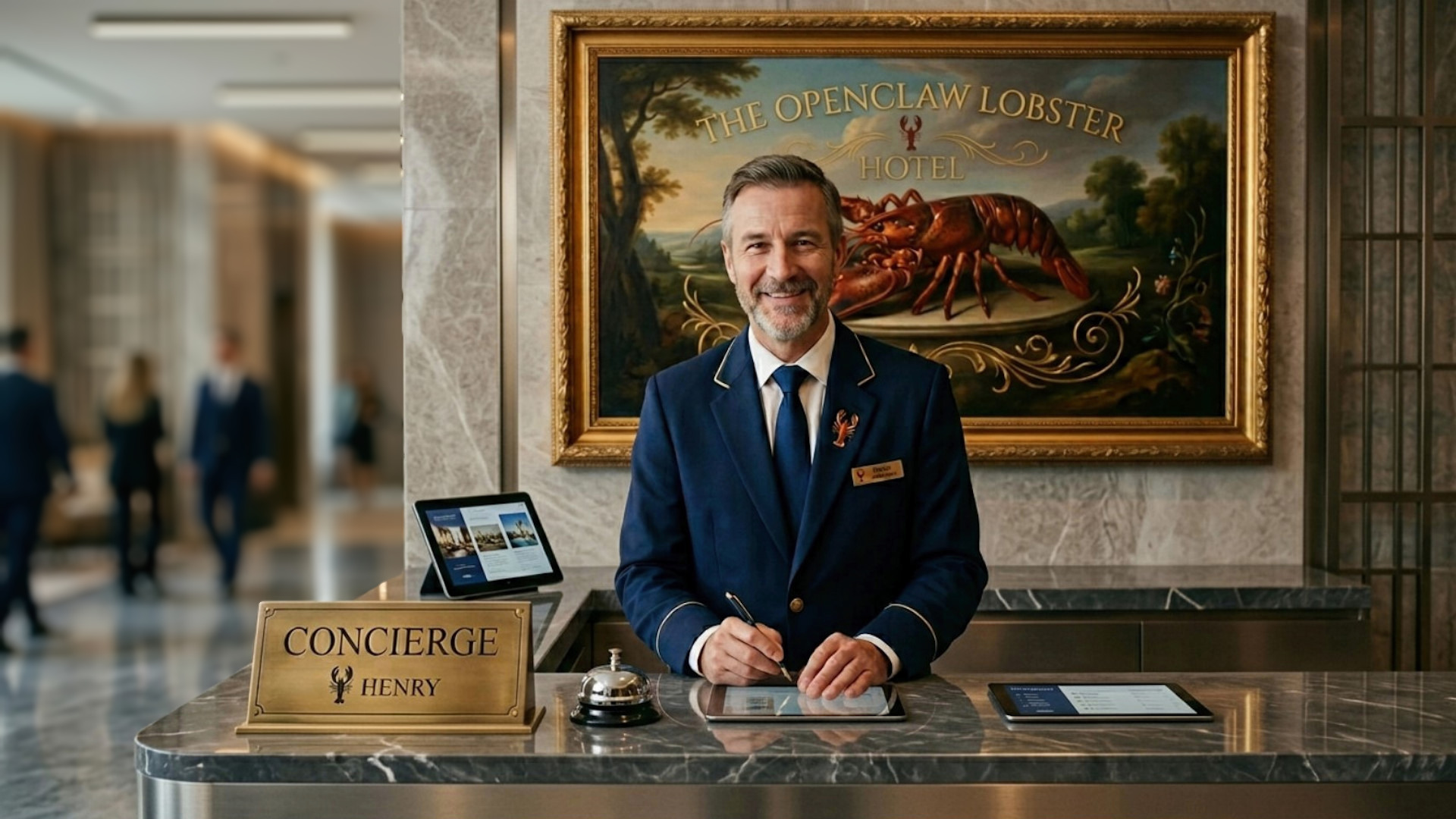
The following use case features are being tested in a private and hobbyist setup for travel groups. It is amazing that this was done with very little work, only on some weekend hours:
- Travel Agent Henry is part of a WhatsApp messaging travel group with a new WhatsApp account based on a fixed line phone number. In that way, OpenClaw traffic is clearly separated from my own WhatsApp account and no other mobile number or phone SIM card is necessary.
- Henry can be given actions within in this WhatsApp travel group by any traveler, if “Henry” is mentioned. Otherwise, Henry keeps quiet.
- Henry can search and analyze Internet pages via the Brave API and the OpenClaw integrated browser. This enables requests like “which pharmacies are open in up to 15km distance when I drive by car within the next 30 minutes?“
- Henry can deliver Google Maps navigation links for requests like “give Google Maps navigation link for nearest supermarket still open selling German beer“.
- Henry created a travel expense-splitting Python application in a WhatsApp vibe coding session with me as a local and simple replacement for the cloud based Splitwise App. Any traveler can send expense information to Henry anytime with text lines or WhatsApp audio messages like those: “Charles spent 16 Euros for Benjamin, Richard and himself for a taxi” or “Carl spent 64 Euros for a museum visit for all” etc. Henry can create a budget balance report for the travel group at any time upon request.
- Henry can read and send mails from his own IMAP-based e-mail account. Henry can use his e-mail to negotiate Restaurant table bookings and other reservation requests.
- The travel group automatically uploads its smartphone photos to Henry’s Nextcloud account, which is hosted in the EU, using the Nextcloud app. Henry let the local LLM do AI image analysis overnight to learn more about the group’s activities and travel preferences.
- Henry proposes two or three alternative travel plans for the following day, taking into account people’s preferences, weather conditions, and location availability. Travel group members can vote on the proposed travel plans using the WhatsApp voting feature.
Which Large Language Models are suitable for local use in Agentic AI?
Would you like to send your highly personal data to cloud-hosted Large Language Models (LLMs), especially if you have to pay for them, and even if they might use your private data for machine learning?
If you’re a European citizen, are you comfortable sending your private data to cloud-based Large Language Models (LLMs) in the U.S. or to servers located within the European Union but controlled by U.S. companies subject to the U.S. CLOUD Act?
Just a few weeks after OpenClaw went viral, the “cloud-first AI” era was disrupted when Google published the powerful, resource-efficient Gemma-4 Large Language Models (LLMs). These LLMs are free, run locally without cloud access, and keep your data private. The permissive Apache v2 open-source license will further support a widespread use of those LLMs, as anybody can use and distribute the Gemma-4 LLMs for any purpose including commercial use, under the terms of the license e.g., for example in AIoT devices, for free.
If you are interested in more details about the free Google Gemma-4 LLMs, read here:
Google’s Gemma-4 model overview article
Especially the Gemma-4 E4B LLM can run locally on small personal computers and even on some high-end smartphones with the Google AI Edge Gallery App for Android and iOS phones. The LLM fits completely into my NVIDIA 12 GB VRAM and supports agentic AI workflows with function-calling, JSON support and multimodal input via text, images, audio and video.
This sounded promising for people like me who spent some money on U.S. cloud-based Anthropic Claude Opus 4.x API tokens to run OpenClaw.
Local AI Image Analysis: Using Travel Photos to Power Agentic AI
The “Super-Power” of my specific travel concierge use case lies in powerful local AI image analysis. Members of the travel group automatically upload their travel photos to a shared Nextcloud folder with the free Android Nextcloud App.
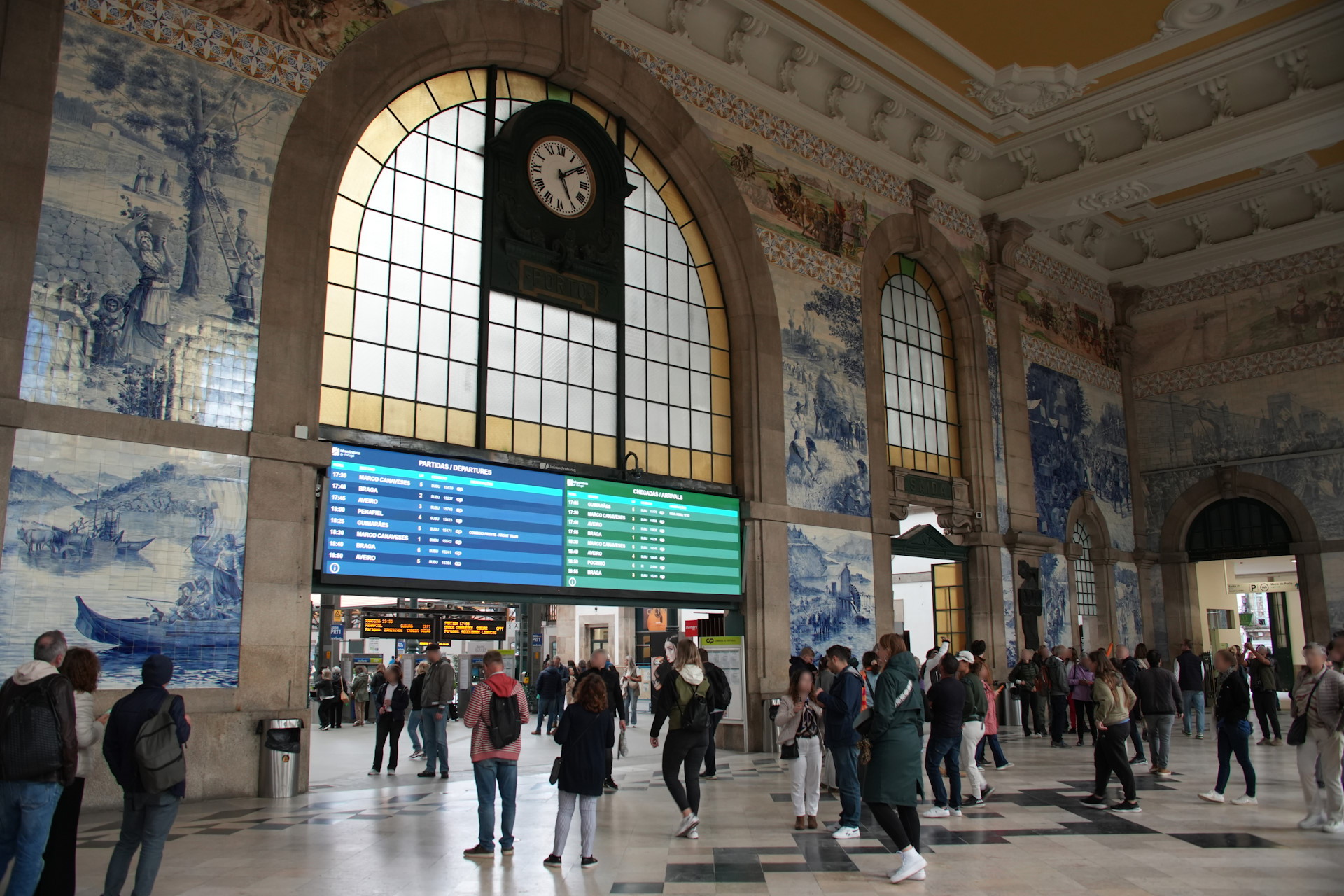
AI agent Henry from time to time downloads the new travel photos from the shared Nextcloud account and locally analyzes the photos with the Gemma-4 and Qwen-3.6 LLMs. It recognizes a specific landmark you visited and suggests a nearby hidden gem for dinner, or it sees a photo of a train schedule and automatically updates the group’s “Travel Task” list with the next departure time performing OCR.
This creates a feedback loop where your physical experiences kept on actual travel photos directly help to optimize the AI’s travel concierge services. All while maintaining 100% data sovereignty.
In my view, the local AI image analysis of the São Bento station travel photo is breathtaking. It delivered following findings:
- The exact location of São Bento Station in Porto (see photo above) was determined: historic train station, identifiable by its architecture and tile work as the São Bento Station in Porto, Portugal
- Cool weather detection: They are dressed in casual, cool-weather clothing (jackets, long pants).
- Understanding about what the people are doing: People are walking, standing, looking at screens. …
- On the left, a few people stand near the wall, looking toward the center.
- In the center, a man in a red and white striped shirt stands with his back to the camera, looking at the departure board.
- To the right, groups of people are walking or standing in clusters, some looking toward the right side of the hall.
- Further back, near the right archway, more people are visible, some taking photos or looking toward the exit.
- Train destinations such as Marco de Canaveses, Braga, Aveiro, and Penafiel were detected.
- Description of the ceiling: Ornate, yellow and white molding and the floor: The floor is paved with a geometric pattern of light and dark tiles.
- The details of the motifs shown on the wall were identified: The walls are covered in intricate blue and white tile murals (azulejos). One mural on the left depicts a landscape with figures. Another on the right shows historical scenes.
- The Atmosphere of the scene: Bustling but orderly. A mix of transit and tourism (people looking at art).
For a small moment, please try to imagine, what insights a LLM could gain from the AI image analysis results of a collection of such personal photos enriched with timestamp and GPS data in the photo’s EXIF metadata. Promising or scary? Do not hesitate to leave your opinion in a comment to this article below.
The local AI image analysis is discussed in more detail here:
Privacy-First Agentic AI: Digital Sovereignty with European Nextcloud feeding local AI image analysis
My use case implementation focuses on a “Privacy-First” and “EU based Nextcloud” philosophy:
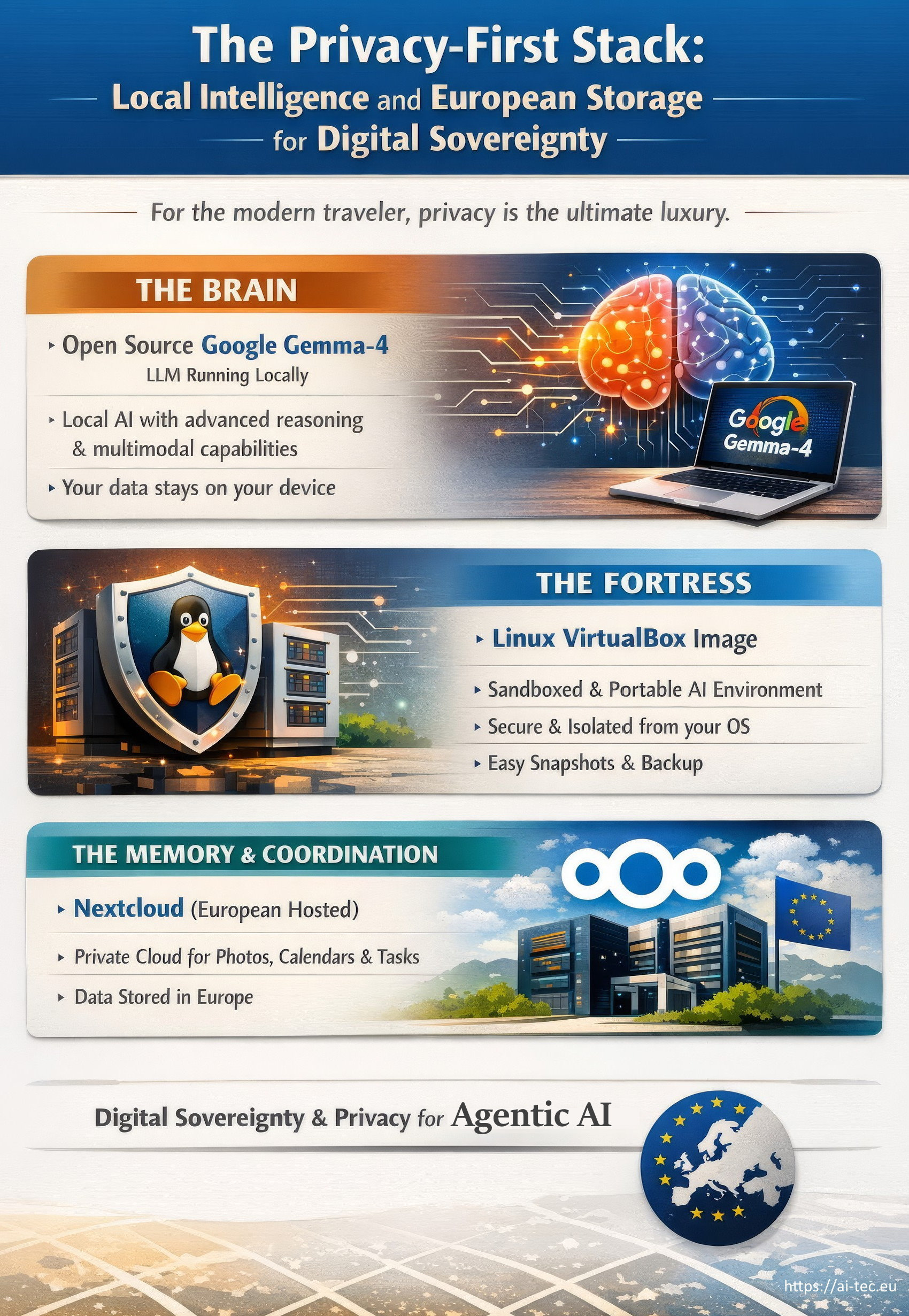
- The Brain: open source Google Gemma-4 LLM running locally. This provides state-of-the-art reasoning and multimodal capabilities without my text, voice and image prompts ever leaving my home.
- The Fortress: A Linux VirtualBox image. This creates a sand-boxed, portable environment for OpenClaw that keeps the AI logic portable and isolated from the primary hosting operating system with additional OS security configurations and firewall rules. As a benefit because of virtualization, the setup can use snapshots to save the state of the OpenClaw virtual machine and backups of the complete OpenClaw setup can be easily taken and restored and moved to other compatible devices. My hosting Linux PC has no WiFi hardware and its own cable separated LAN to an exclusive router with direct Internet access without any connection to my local network.
- The shared Travel Photo Storage & Travel Group Coordination tool: European Nextcloud. Instead of Google Photos or Apple iCloud, Henry uses a Nextcloud account hosted in the European Union as the central travel photo repository for local AI image analysis. Henry also uses the Nextcloud calendars, tasks, and contacts for orchestrating the travel group organization.
“Planned Upgrade” for the Travel Concierge Use Case
The following travel concierge use case upgrades are planned for some time in the future:
- AI agent Henry should speak in local foreign language, e.g. Spanish or Italian for his e-mails and phone calls e.g., to more easily do restaurant and other reservations.
- Henry should do pro-active phone calls to Restaurants to negotiate a table booking which is a best possible matching to the needs of the travel group by doing a phone call and speaking in the local foreign language with the retaurant staff.
- Using the even advanced AI image analysis of bigger local LLMs on the travel group photos, which will be even more detailed and informative, as the Qwen 3.6 LLM analysis result shows in my other article here: Local AI image analysis with free Gemma-4 and Qwen-3.6 LLMs
- Ideally, a European open source LLM will be suitable to run with my local OpenClaw setup in the future e.g., a LLM from Mistral.ai or other hopefully emerging European LLM providers with substantial tool-usage, function-call and multimodal capabilities!
- Splitting the Travel Concierge AI agent into a set of specialized, orchestrated sub-agents: such as a booking agent, AI image analysis agent, travel expense agent, remaining-tasks agent, and an orchestration agent. Each agent with its own task-focused context and memory.
- Utilizing the OpenClaw dreaming feature for maximizing the overall-intelligence among daily AI image analysis on the travel photos including timestamp and GPS data out of the EXIF metadata.
10 Technical Lessons Learned
If you are not deep into IT and OpenClaw, please just skip this technical section and jump directly to the “Summary and Rundown” section.
This article is based on hands-on experience.
- The Gemma-4 e4b models seem to have much weaker tool-use / function-call capabilities than Claude OPUS 4.x. For example, to get the Himalaya IMAP and SMTP mailing used by OpenClaw working with the German e-mail servers of “all-inkl”, hands-on debugging inclusive log file analysis of the bash shell commands generated by the Gemma-4 e4b model was necessary. After finding a work around, my manual additions of “how to use the Himalaya tool for all-inkl mailservers” section into TOOLS.md made my e-mail setup running as expected.
- The vibe coding of the travel expense splitting python app within OpenClaw was quite easy with the costly cloud-based Anthropic Opus-4.x LLM, but I am still struggling to get feature changes working with the free Gemma-4 and Qwen-3.6 models.
- OpenClaw is in heavy development with many, sometimes daily updates. I experienced 8 OpenClaw updates in 12 days. Do not expect “openclaw doctor” to always solve all your OpenClaw problems and be ready for hands-on problem solving with profound Linux knowledge.
- If you are not an IT-native with hands-on experience including bash Linux shell scripting, logfile analysis and debugging, system- and network- adminstration, better get a pre-configured and maintained OpenClaw instance hosted in an EU cloud. But going the hosted route will definitely keep you somewhat away from fully exploiting the potential of OpenClaw as the intentional direct access to local resources is missing.
- OpenClaw version updates attempt to migrate your previous OpenClaw.json configuration settings to a new configuration structure with new features. However, this does not always work as expected, and many people, myself included, experienced serious problems after updating to version 2026.3.27, such as losing memory access for LLM sessions. If there’s no compelling reason to update OpenClaw, it’s usually best to leave the system as is. And if you update, better backup your running OpenClaw setup as a complete virtual image in a safe place so you can “instantly” move back to have a running OpenClaw system if the update failed.
- Currently and in my opinion, it is difficult to perform a full deinstallation of OpenClaw. Therefore, it is advisable to have a “pre-configured Linux virtual image” always ready from which to start a completely new OpenClaw installation from scratch, to which you can then apply your documented previous changes and extensions if an OpenCLaw version update failed.
- The sending of any WhatsApp messages to Henry from any other WhatsApp number as granted is strictly forbidden by appropriate channel policies in the OpenClaw configuration (openclaw.json). In my opinion, the WhatsApp security policy setup was somewhat frustrating due to the hierarchical policy architecture of OpenClaw and the structural configuration changes in the early OpenClaw updates.
- For me, it’s clear that buying a basic Mac Mini M4 today just to run OpenClaw would be wasteful. However, in the future, it will be far more interesting to use a higher-end Mac Mini M5 Pro with 64 GB of “VRAM-like” high-speed unified memory to run larger, more powerful open-source LLMs locally and an OpenClaw virtual image in parallel. This complete local OpenClaw setup including LLMs will run continuously at a fraction of the electricity power consumed by Intel-based PCs with larger or several NVIDIA RTX graphics cards.
- With the switch to the M5 Pro architecture I plan a dramatic electic power and cubic inch saving between 70% to 90%. Agentic AI only makes fun if the entire system runs continuously!
- If Henry or OpenClaw goes rogue or on nuts, the system is safeguarded by an home automation “emergency off” power switch accessible via a mobile phone app. Email sending is safeguarded by SMTP email sending service monitoring on a smartphone, as well as mobile phone notifications for any e-mail Henry sends with a SMTP-wrapper.
Summary and Rundown
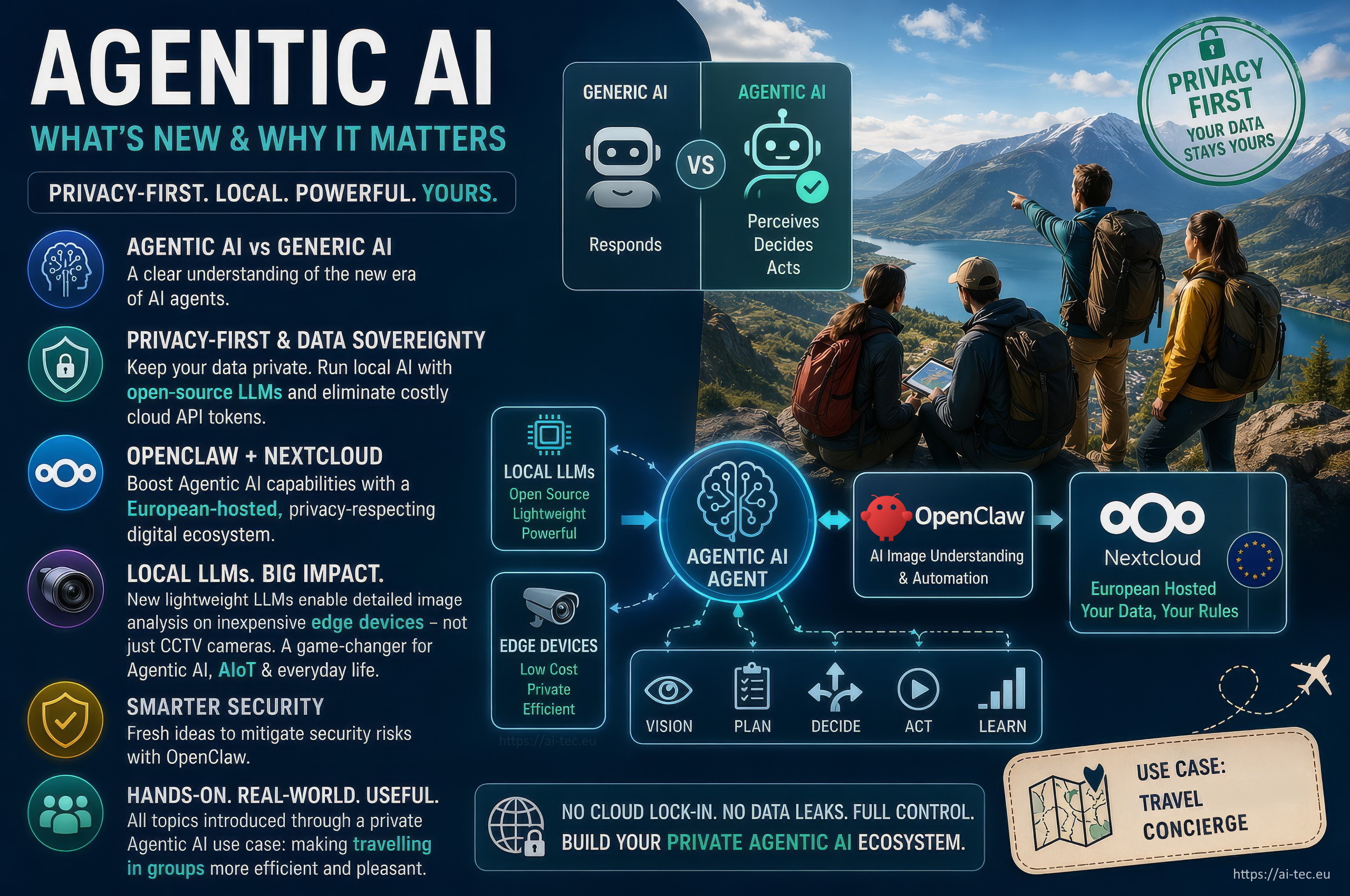
The following topics were covered by the OpenClaw Agentic AI travel concierge use case:
- A clear definition of the new term of “Agentic AI” and how it compares to the well-known “Generic AI“.
- An Agentic AI “privacy-first strategy” for data sovereignty, featuring two key implementation approaches to keep your data truly private, while eliminating the cost of running large language models (LLMs) in U.S. or Chinese clouds and paying for expensive API tokens:
- Doing local AI using new open-source large language models (LLMs) that are lightweight and suitable enough.
- Combining OpenClaw with a Nextcloud server hosted in the Europen Union will enhance the Agency AI features and bypass US-based IT services like Apple iCloud and Google Workspace (Cloud Drive, Calendar, Contacts), etc.
- In the words of Peter Steinberger, the inventor of OpenClaw, the “banger of this article” is the insight that open-source, locally running large language models (LLMs) are powerful and resource-saving enough for a detailed image analysis on inexpensive edge devices. Not only in surveillance cameras and they will push the wide-spread use of AIoT devices.
- Some fresh ideas for mitigating security risks using OpenClaw.
You might be interested especially in two of my other articles, such “The Spy in the Fridge“, which discusses the risks of AIoT, and “The Eight Key Concepts of OpenClaw“, with includes an infographic.
Security Warning
OpenClaw is an experimental system with significant security risks. Do not attempt to replicate or deploy the use case described in this article unless you have the full expertise to properly assess and mitigate these risks.
Be aware that systems running OpenClaw may become unstable, inaccessible, or experience complete data loss at any time. You should also avoid exposing sensitive or unnecessary information to the system under any circumstances.
Here are additional relevant articles
Comments are welcome
Constructive comments (via the comment function at the bottom of this page) are greatly appreciated and suitable changes and additions to this blogpost will be taken into account. All statements in this blog post reflect the personal opinion of the author, which may not always be accurate due to incomplete information and are not factual claims.
Please note that comments are subject to manual review to prevent spam, which may cause a delay in their display.
Shortlink
For easier sharing and access to this blog post, use this short link:

2 replies on “Agentic AI: Travel Concierge Use Case with OpenClaw”
Its a nice idea to use local AI models for image analysis of travel photos.I did the same to improve image search results on my big NAS with the large gemma-4 dense model which worked better for me than qwen 3.6.
I’m frustrated with former OpenClaw updates because of stability and memory loss issues, but latets releases seem to be better tested.
good job chris